


Peachat - Live Video Chat
4.61.59K Reviews
App Specs
- Version
- 2.6.0
- Updated On
- License
- Free
- Downloads
- 5,000,000+
- Developer
- Peachat Video Chat Apps
- Categories
- Social
- Platform
- Android
Screenshots


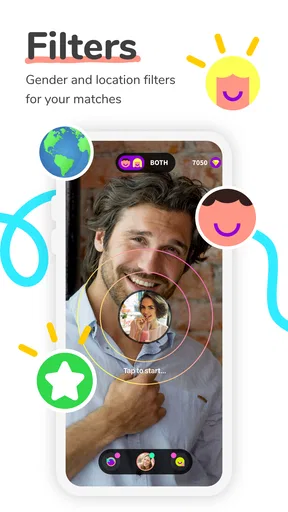

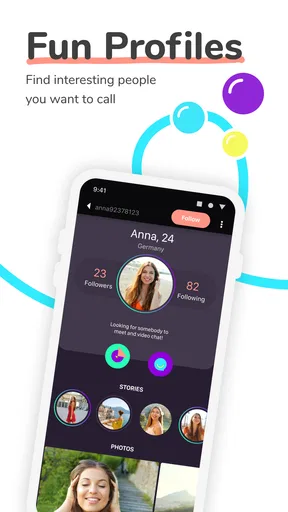
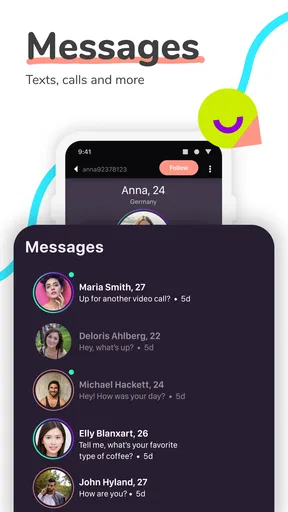
 Analysis by AppCompare
Meeting someone through a live video chat feels very different from browsing profiles or sending messages first. That immediacy is the main reason I found Peachat - Live Video Chat interesting: it puts the conversation before the long introduction. I can open the app, enter a random video interaction, and quickly discover whether a conversation feels natural. That makes it more spontaneous than most social apps, but it also demands better judgment because the person on screen is a stranger.
Peachat is a free social app from Peachat Video Chat Apps, aimed at adults rather than casual family use. It carries a Mature 17+ rating, has passed the five-million-install mark, and holds a 4.6 average from about twenty-eight thousand ratings. Those figures suggest that the concept has found a sizable audience, although they should not be mistaken for a guarantee that every conversation will be enjoyable or respectful.
How the live-chat experience feels in everyday use
The first thing I notice with a random video service is speed: not just how quickly an app opens, but how little time passes before I understand what to do. Peachat benefits from a straightforward purpose. It is not trying to make me build a detailed public profile, manage a large feed, or learn a complicated set of menus before I can interact. The central idea is immediate conversation, and that focus makes the app easier to approach than a social network built around many different activities.
That simplicity is useful when I have a short break and want a genuinely social moment rather than another stream of posts. For example, I could use it after work while waiting for a friend, keeping the session brief and treating each chat as a small encounter rather than expecting to create a lasting friendship every time. This is where the app feels most natural: as a quick doorway into conversation, not as a replacement for a carefully built social circle.
The random element also changes the pace. With a messaging app, I can read a profile, decide whether to reply, and compose a thoughtful opening line. Here, the visual interaction arrives much sooner, so I need to make decisions quickly. That can make the experience lively, but it can also make an awkward match feel more intense. I recommend entering with a clear idea of what I am comfortable discussing and leaving promptly when the tone is wrong.
What makes it different from ordinary social apps
Compared with text-first platforms, Peachat removes much of the waiting. There is no need to maintain a conversation through several rounds of messages before discovering whether the other person is engaged. Video can make a friendly exchange feel more personal, and facial expressions often communicate things that text misses. On the other hand, text apps give me more control over timing, privacy, and self-presentation. If I prefer to think before responding, random video is not automatically the better format.
It also differs from dating-focused services because its central appeal is meeting people spontaneously rather than carefully filtering a list of potential matches. That distinction matters. Someone looking for structured compatibility tools, detailed profiles, or a predictable path toward a relationship may be more comfortable with a dedicated dating service. Peachat makes more sense for someone who enjoys discovering conversations without knowing exactly where they will lead.
Worth Reading Before You Choose

EA SPORTS FC Mobile 26 Is a Bigger Football Game, but It Takes Time

Flipboard Shows What News Apps Must Do Beyond the Feed

Switching to Android Auto Means Rethinking Your Driving Routine

Google Calendar Makes a Crowded Week Easier to Manage

Ludo King Makes the Most of the Minutes Between Plans

Baby Panda World Brings Quick Play to Modern Phones, but Its Game Library Feels Busy
The trade-off is simple: Peachat saves time before a conversation, but it gives me less control over who appears and how quickly the interaction develops. Understanding that trade-off prevents disappointment. The app is not a magic shortcut to meaningful friendships; it is a fast way to create the possibility of one.
Speed expectations and the role of the connection
Video chat naturally depends on more than the application itself. The quality of the network, the phone’s available resources, and the other participant’s connection all influence how smooth a call feels. I would therefore judge Peachat by how quickly it lets me reach the useful part of the experience, while remembering that a delayed or unstable conversation may originate outside the app.
For the best chance of a comfortable session, I would use it where the connection is dependable, keep other demanding apps closed, and avoid starting a call when the phone is already struggling. This is not a special trick for one particular handset; it is especially relevant here because live video has less tolerance for interruptions than text messaging. A message can wait through a delay. A face-to-face exchange becomes uncomfortable when the image or audio repeatedly falls behind.
There is another practical speed issue: the pace of random matching can encourage impatience. If a conversation does not feel right, I may be tempted to move on immediately, but rapidly skipping through encounters can turn the app into a reflex rather than a social experience. I get more value when I give a respectful opening moment to a promising conversation, then leave cleanly if there is no common ground.
Heavy-use moments and resource awareness
Live video is more demanding than browsing a social feed because the phone must handle the camera, microphone, moving images, and network traffic at the same time. Even without quoting a device benchmark, I would expect longer sessions to place more pressure on battery life and warmth than short text exchanges. That is not a reason to avoid Peachat, but it is a reason to use it deliberately rather than leaving a video session running while doing other intensive tasks.
My preferred routine would be to begin with a short session, check whether the phone remains comfortable, and then decide whether to continue. A device that feels warm or starts slowing down is telling me to pause. I would not use the app as background entertainment while navigating, charging in an unsuitable place, or handling anything that requires attention. Video chat deserves the same care as any live conversation.
Heavy use can also mean repeated sessions rather than one long call. If I am exploring many random conversations, the camera and network remain active again and again, which can consume more of the phone’s resources than a single occasional check-in. Closing the app fully when I am finished is a sensible habit, especially on an older device. It also makes it easier to tell whether a later slowdown is related to the app or to the wider state of the phone.
The current version is 2.6.0, and the app supports devices running Android 6.0 or later. That broad operating-system requirement makes it approachable for people who do not own a recent phone, but operating-system compatibility is not the same as a guarantee of equally smooth video on every model. A newer handset with a stable connection is likely to offer a more comfortable experience than an aging phone with limited remaining storage or battery capacity.
Reliability, recovery, and handling interruptions
Reliability in a random video app is about more than whether it launches. I also care about what happens when a connection drops, when I accidentally leave a conversation, or when the phone receives another call. Live communication is inherently sensitive to interruptions, so I would treat recovery as part of the normal experience rather than assuming every session will remain uninterrupted.
My practical approach is to keep expectations modest: if a conversation breaks, I would first check the connection and reopen the app before blaming the phone. If the issue repeats, I would stop for a while instead of repeatedly forcing new sessions. Restarting a phone can help when the device itself has become sluggish, but it cannot fix a weak network or an unsuitable environment. This simple distinction saves time and prevents frustration.
I also prefer using the app when I can give it my full attention. Switching rapidly between a video conversation and other tasks creates more opportunities for the session to be interrupted, and it makes it harder to notice whether the problem is technical or social. A quiet setting, a charged phone, and a stable connection do more for perceived reliability than optimistic expectations.
There is a social reliability issue as well. A smooth connection does not guarantee a good interaction. Random matching means that conversations can vary widely in tone, patience, and usefulness. I would not interpret a poor encounter as evidence that the entire service is unreliable, but I would take repeated uncomfortable interactions seriously and leave rather than trying to rescue every conversation.
Privacy habits matter more than the novelty
Because Peachat puts strangers in front of me through live video, I would avoid showing personal documents, workplace details, school information, recognizable home features, or anything that reveals where I live. I would also keep conversations away from financial information and private account details. These are basic precautions, but they are especially important when the interaction begins before I know anything meaningful about the other person.
A useful habit is to choose a neutral background and use headphones when appropriate. A neutral background reduces accidental disclosure, while headphones can make a conversation easier to follow in a shared space. I would also decide in advance what I will do if someone becomes insulting, sexual, threatening, or simply persistent after I want to end the exchange: leave immediately, avoid arguing, and use any available in-app safety controls rather than escalating the conversation.
The Mature 17+ classification is a clear reminder that this is not an app I would hand to a child or treat as a supervised family activity. Parents should not assume that a social video environment is suitable just because the download is free. For adults, the age rating does not remove the need for boundaries; it simply sets an expectation that the content and interactions may not be appropriate for younger users.
Costs, optional spending, and the free starting point
Peachat can be downloaded and used as a free app, which makes trying the basic idea relatively easy. However, it includes in-app purchases ranging from $0.99 to $134.99 per item. That is a wide span, so I would inspect every purchase screen carefully and decide beforehand whether I am willing to spend anything at all. The free entry point is useful for testing whether random video conversation suits me before committing money.
I would be particularly cautious about paying during a moment of frustration. If a match is poor or the experience feels slow, spending more is unlikely to turn every future conversation into a good one. The sensible workflow is to use the free experience first, evaluate the quality of interactions and the phone’s performance, and only then consider whether an optional purchase offers a benefit I genuinely understand.
This payment model also affects who should skip the app. Anyone who wants a completely predictable, no-purchase social tool may prefer a messaging service with no in-app spending path. Peachat is more suitable for someone comfortable exploring a free service while keeping a firm budget and treating paid elements as optional rather than necessary.
Who will enjoy it, and who should choose something else
I think the app is a good fit for adults who like spontaneous conversation, can handle a little awkwardness, and are comfortable making quick decisions about boundaries. It may appeal to someone new to a city, a person practicing casual conversation, or anyone who finds text-based introductions too slow. The video format can help a shy user move beyond endless typing, although it may feel demanding at first.
I would not recommend it as the first choice for someone seeking carefully screened contacts, professional networking, private one-to-one messaging with known friends, or a highly structured dating process. Those goals are better served by apps designed around profiles, contacts, or compatibility rather than random encounters. It is also a poor match for anyone who strongly dislikes appearing on camera or feels pressured by immediate interaction.
Another exception is the user with an older or heavily loaded phone. Android 6.0 compatibility means the app can run on a wide range of devices, but a phone that already struggles with camera tasks may deliver a disappointing experience. In that situation, a text-first alternative would be more forgiving and less demanding on the device.
My performance verdict after weighing the whole experience
Peachat succeeds because it keeps the distance between opening a social app and meeting another person short. Its live format creates a sense of presence that ordinary feeds and delayed messages cannot reproduce. The large install base and strong average rating show that many people find the idea appealing, but my recommendation is still conditional: the app is valuable when I want spontaneous adult conversation and accept the unpredictability that comes with it.
From a performance perspective, I would describe it as a focused live-video tool rather than a lightweight background app. The most comfortable results should come from a stable connection, a phone with enough breathing room, and sessions that are intentional rather than constant. If a call falters, I would check the network and device state, restart only when necessary, and avoid assuming that every interruption is an application failure.
The developer, Peachat Video Chat Apps, has kept the product centered on its main social purpose, and that focus is both its strength and its limitation. There are fewer layers between me and a stranger’s video conversation, but also fewer buffers protecting me from awkwardness, unwanted behavior, or an unproductive match. My advice is to try it free, protect your privacy, set a spending limit, and judge it by the quality of several real conversations rather than one lucky or disappointing encounter.
In the end, I would recommend Peachat to the right kind of user, not to everyone. If you want quick, unpredictable video encounters and can leave a conversation without taking it personally, it offers a distinctive social experience. If you want control, quiet messaging, carefully selected contacts, or minimal demands on your phone, another category of app will suit you better. For adults who value immediacy and use sensible boundaries, this is a worthwhile experiment; for anyone expecting a polished substitute for trusted friendships, it is better approached with realistic expectations.
Pros
- Quickly connects you with people through live video chat.
- Simple interface makes starting conversations easy.
- Supports spontaneous social interaction from anywhere.
- Video chats can feel more personal than text messaging.
- Useful for meeting users with similar interests.
Cons
- Interactions with strangers may raise privacy and safety concerns.
- Video calls can consume significant mobile data and battery.
- Connection quality depends heavily on both users’ networks.
- Some features or interactions may require in-app purchases.
- User activity and conversation quality can vary by time and region.
FAQs for Peachat - Live Video Chat
What is Peachat - Live Video Chat, and how does it work?
Peachat - Live Video Chat is a social communication app designed for meeting people through live video conversations, messaging, and interactive online features. After creating an account, users can browse available profiles, connect with other members, and start conversations when both sides are comfortable. The experience depends heavily on the active community, internet quality, and the privacy settings selected in the app.
Is Peachat - Live Video Chat free to download and use?
The app can generally be downloaded without an upfront purchase, but some communication or social features may be limited or supported by in-app purchases, virtual items, subscriptions, or other paid options. Before spending money, check the current pricing shown in the application and review the payment terms carefully. Availability and costs can vary between Android and iOS.
Is Peachat safe for meeting and talking to strangers online?
Peachat includes the usual risks associated with live video chat platforms because conversations involve people you may not know personally. Avoid sharing your address, phone number, passwords, financial details, or private photographs. Use blocking and reporting tools whenever necessary, and remember that profiles may not always represent a person accurately. Parents should supervise younger users and review the app’s age requirements.
Does Peachat require a strong internet connection or special permissions?
Because Peachat focuses on real-time video and social communication, a stable Wi-Fi or mobile-data connection is recommended for smoother calls and fewer interruptions. The app may request access to the camera and microphone for video conversations, as well as notifications or other device permissions. Grant only the access you are comfortable with, and review permission settings through your Android or iOS privacy controls.
Can I control who contacts me or stop unwanted users on Peachat?
Users should review the app’s privacy, chat, and profile controls before becoming active. Depending on the current version, you may be able to block accounts, report inappropriate behavior, restrict interactions, or manage notifications. If someone becomes abusive, requests personal information, or behaves suspiciously, end the conversation immediately and use the reporting tools rather than continuing the exchange.


